


ALL >> Technology,-Gadget-and-Science >> View Article
Axigen - The Easy And Effective Way To Mobile Email



Today's business world is fast-paced, highly versatile and mobile. Multiple branches, employees traveling from one city to another for weeks in a row, customers from multiple countries and time zones become commonplace, forcing companies to rely more and more on mobile devices to stay ahead. As instant access to information regardless of time and location becomes mission critical, it triggers the exponential growth of mobile email communication.
Quick access to one's inbox, appointments and tasks leads to increased productivity and efficiency, business-wise, and, on a personal level, allows road warriors and frequent travelers to stay in touch with their family and friends. Take a tour of AXIGEN's advanced mobile email and collaboration features to learn how to get the best of the high-end technology already at your fingertips.
1. Mobile Webmail
The AXIGEN messaging solution uses an advanced mobile webmail interface that supports all mobile web browsers compatible with the XHTML format for page rendering. The mobile webmail is integrated into the same server module and therefore provides ...
... seamless access to information to all users just like the regular webmail interface. When accessing the AXIGEN webmail interface, the end-user Mobile Browser ID String (User Agent ID) is identified and the mobile webmail is loaded and rendered automatically.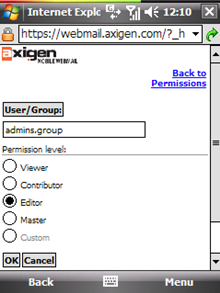
Figure no 1
The AXIGEN mobile webmail interface provides access to the following features:Basic email access (read, write, reply etc.)Advanced email access (move, delete, attachments etc.)Folder managementPublic folder accessAdvanced email searchSharing and permissions managementMoreover, the new Mobile Browser ID String (User Agent ID) can be further added, therefore extending the integration capability of the AXIGEN mobile webmail with newer terminals.
The mobile webmail setup involves the activation of the webmail service from the web administration interface (WebAdmin) for users intended to have access to it and enabling the mobile capabilities for this service by checking the corresponding option on the service setup page. Once this simple procedure is completed any supported mobile terminal will have access to this feature.
For more information and details regarding the AXIGEN mobile webmail, visit this documentation page:
http://www.axigen.com/docs/en/Working-with-the-Mobile-WebMail-Interface_454.html
TRIAL: http://www.axigen.com/mail-server/free-webmail.php
2. IMAP/POP3 and SMTP Access
The majority of modern mobile terminals have now built-in email clients that can be used to connect to the AXIGEN Messaging Solution using the same settings that apply on the MUA (Mail User Agent / Email client) on the desktop systems. The same credentials are used for these mobile accounts, and from the server's perspective the same communication process takes place.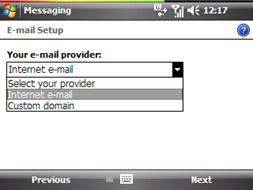
Figure no 2
This method is very comfortable both from the user's perspective and from the network / system administrator's perspective. Because these email clients typically use standard protocols such as POP3, IMAP4 and SMTP, the configuration overhead is completely avoided. To allow users access to their mailbox content, no server-side configuration is required (given the desktop clients can access the mailboxes). The users need to configure the email clients according to specifications provided by the terminal manufacturer.
For the complete white-paper, please visit: http://www.axigen.com/articles/axigen---the-easy-and-effective-way-to-mobile-email_45.html
Add Comment
Technology, Gadget and Science Articles
1. Top 10 Shopware Migration Challenges Businesses Should KnowAuthor: BrainStream Technolabs
2. Easemytrip Api Scraping For Automated Hotel Data Extraction
Author: iwebdatascraping
3. Secure Connected Medical Device Software Development: Best Practices
Author: shivali
4. # Sand Blasting Vs Chemical Rust Removal: Cost, Time And Finish Compared
Author: Sam
5. From Sales History To Smarter Production: Using Odoo Implementation For Mps Forecast Suggestions
Author: Alex Forsyth
6. Glassdoor Employer Review Intelligence Report 2026
Author: iwebdatascraping
7. The Whisky Exchange Data Scraping Api — Real-time Inventory, Cask & Rare Bottle Data
Author: REAL DATA API
8. Implementing Custom Workflows In Sitecore Content Hub: A Step-by-step Guide
Author: Addact Technologies
9. The Production Blueprint Of A Podcast Clipping Agency
Author: Jennifer White
10. Top It Services For Reducing Downtime In Senior Living Communities
Author: Exordium Networks
11. 9 Types Of Firewalls To Improve Security
Author: brainbell10
12. Libdib Data Scraping Api — Real-time Wholesale Alcohol Inventory, Craft Spirits & Wine Data
Author: REAL DATA API
13. Tts Mobile App Roundup: Medtour+assist And Pokkettrek Get Upgrades For Next Versions
Author: D Edward Levy
14. How To Manage Customer Conversations Across Multiple Channels
Author: Usama Naseer
15. 9 Amazing Mobile Apps Built With React Native
Author: brainbell10