


ALL >> Computers >> View Article
Usb Safeguard 3.0 Protects Your Usb Pen Drive With A Password!



Misplacing the flash drive is a common occurrence due to its small size. The flash drive is portable and handy but losing important data may cost you a lot more than just inconvenience. The data you have backed up in your pen drive may be highly personal or important and you do not want them to fall into the wrong hands. To safeguard your private and confidential data from being leaked out when incidents like this happen, getting an encryption tool such as USB Safeguard can be a good idea.
USB Safeguard is a portable software program to encrypt and protect data with a password on your removable pen drive using the AES 256 bits encryption. USB Safeguard offers users (novice and expert) a friendly yet extremely powerful security solution that fully protects valuable data stored on USB pen drive. Also, has a useful feature that allows you to enter your email or phone if you lose the pen drive.
This portable program does not require any installation, once downloaded, just copy the file "usbsafeguard.exe" on the root of the pen drive and start it.
How ...
... it works:
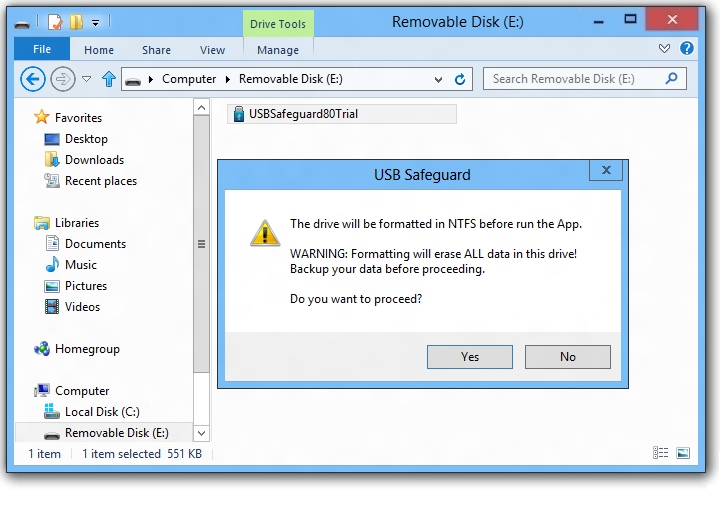
1. When you start it the first time, a message will appear asking you to initialize the pen drive, follow the istructions and press Yes to start the procedure (which takes less than a minute).
NOTE: The initialization procedure is only if your pen drive is not already FAT32 formatted.
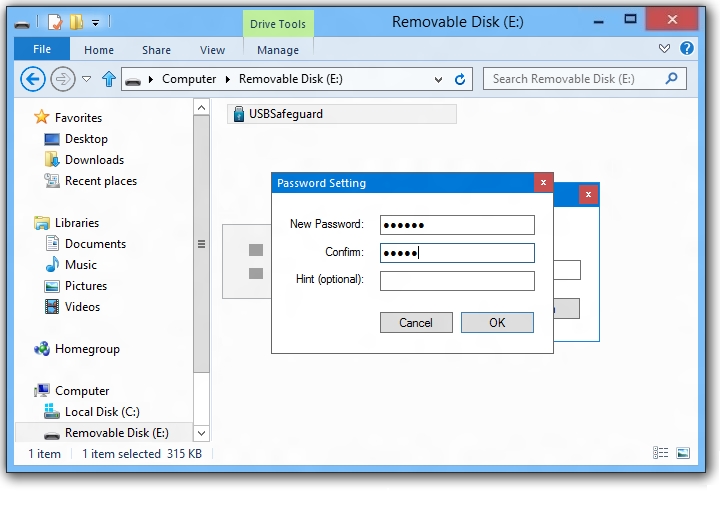
2. Set your password and press Lock button to lock the pen drive and protect files stored in it.
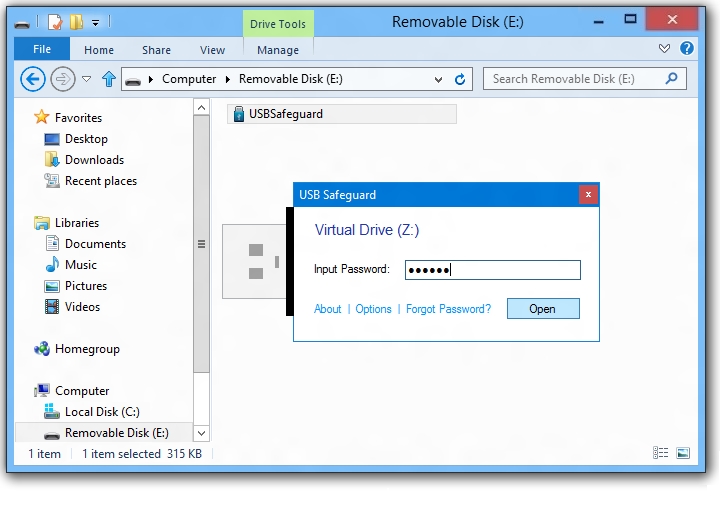
3. To unlock, launch the program from the pen drive. Type the password and press Unlock button.
4. Click on help icon (?) to set your contact details (email or phone) in case you loose your pen drive.

The software is easy to use and when you lock the pen drive, it's write protected and data are safe and hidden, also you can press ALT+K to open the Windows on-screen keyboard to type the password, this is particularly useful if you suspect that there is a keylogger installed on the computer you're using.
You can download USB Safeguard from www.usbsafeguard.com
Andrew Jordy is a collaborator of USB Safeguard, Soft.
Add Comment
Computers Articles
1. Managed Soc Services For It CompaniesAuthor: Devendra singh
2. Ai Data Protection Compliance: Best Practices For Secure Business Operations
Author: Devendra singh
3. Privileged Access Management (pam): Strengthening Enterprise Security And Access Control
Author: Umangp
4. Qlikview Tutorial For Data Analytics: Create Interactive Dashboards And Reports
Author: Tech Point
5. Enterprise Email Security: Strengthening Protection Against Evolving Email Threats
Author: Umangp
6. Access Management Market Trends: Future Growth And Emerging Technologies
Author: Umangp
7. Mobile App Scraping
Author: MObile app scraping
8. Master Data Management Solutions: Driving Data Quality Through Ai And Cloud
Author: Umangp
9. Digital Marketing Analytics Platforms: Key Trends, Benefits, And Future Market Outlook
Author: Umangp
10. Ai Governance Market: Trends Driving Responsible Ai Adoption
Author: Umangp
11. Spark Matrix™: Access Management
Author: Umangp
12. The Future Of Digital Content In India: Why Photo Sharing And Cloud Storage Are Converging
Author: vijaylaxmi soni
13. Looking For German Industrial Chemicals Suppliers? Choose The Right Partner With Roteschemie
Author: Roteschemie
14. Ai Augmented Software Development: Ai-driven Coding, Automated Testing, Risk Prediction, Team Collaboration, Productivity, And Market Outlook
Author: Umangp
15. Kiosk Systems In Hyderabad For Modern Businesses
Author: pbs