


ALL >> Computers >> View Article
Xml Converter Converts Xml To Other Formats With Speed And Accuracy



Do you remember the last time you had to convert XML to CSV or other formats? Try and remember how much time you spent on creating XML transformations or XSL stylesheets. As daunting as that may have been, you can be pretty certain that next time you'll have to do the export, it's going to be as tiresome and time-consuming as before. Luckily, there is a new XML converter that puts the conversion job on autopilot.
Advanced XML Converter is an XML Converter that fixes a common problem many people have when they want to convert XML to CSV. Quickly and automatically, tool export XML to HTML, XML to CSV, XML to DBF, XML to XLS and XML to SQL - all with much precision and in in a few moments.
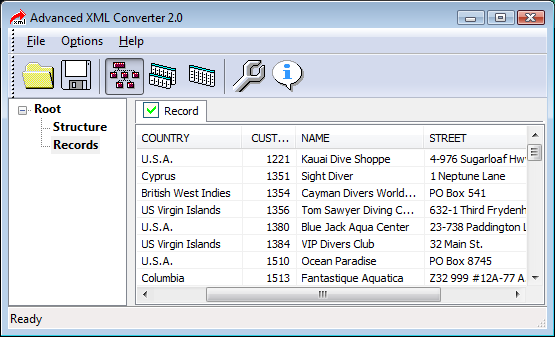
To begin, you select an XML file to be converted. The XML program parses the file quickly, groups tags by name and shows XML structure and records. If necessary, the order of fields can be rearranged, and some fields ...
... can be hidden to make it more handier to view data. Then, the program allows choosing the data you would want to see in the output file and choose custom export settings. For example, you can choose HTML table styles, CSV delimiters, fields and tables, edit field sizes in the output files, enable or disable inheritance of data from nested tags and choose many other settings. When you are ready to begin the export, just click the Export tables button, and the application will open the wizard where you can choose the output directory, output format, and select to export tables as a single file or multiple files reflecting the structure of the XML source.
Conversion begins when you click the Convert button. Data from the XML file is instantly converted and saved onto your PC in a format you specified. Regardless of the size of XML data, export is performed quickly thanks to the fastest export engine on the market. Typically, the conversion finishes in seconds.
If you have more than one XML file to convert, Advanced XML Converter allows you to run batch export. Simply choose the directory with source files, output folder and required file format and click Convert. The XML program will convert files one by one in the completely unattended mode, even when you are away.
According to my estimates, Advanced XML Converter will save up to 60% of time and money, as compared to creating an XML transformations or XSL stylesheets. The program sells at $49 (USD) which is a way more affordable than purchasing several dedicated database packages separately. There are also multi-user licenses that cost significantly less than the purchase of several personal licenses. Moreover, users with specific conversion needs can buy a narrow license for $24 to convert XML only to one format: HTML, CSV, or XLS.
Add Comment
Computers Articles
1. Digital Marketing Analytics Platforms: Key Trends, Benefits, And Future Market OutlookAuthor: Umangp
2. Ai Governance Market: Trends Driving Responsible Ai Adoption
Author: Umangp
3. Spark Matrix™: Access Management
Author: Umangp
4. The Future Of Digital Content In India: Why Photo Sharing And Cloud Storage Are Converging
Author: vijaylaxmi soni
5. Looking For German Industrial Chemicals Suppliers? Choose The Right Partner With Roteschemie
Author: Roteschemie
6. Ai Augmented Software Development: Ai-driven Coding, Automated Testing, Risk Prediction, Team Collaboration, Productivity, And Market Outlook
Author: Umangp
7. Kiosk Systems In Hyderabad For Modern Businesses
Author: pbs
8. Content Clipping: The Video Repurposing Fix
Author: Jennifer White
9. Direct Thermal Barcode Printer Hyderabad
Author: prime pos
10. Choosing The Right Library Management Software To Streamline Your Library Operations
Author: Yoo Library
11. Drug Monitoring And Incubator Monitoring Support Reliable Conditions For Research Healthcare And Laboratory Environments
Author: Chris Miller
12. Desktop Rental Solutions For Events, Exhibitions, And Conferences
Author: Rashi
13. Point Of Sale Machine For Shops: How To Choose The Right One
Author: pbs
14. Master Data Management Vendors 2026: Spark Matrix™ Analysis By Qks Group
Author: Umangp
15. Ecommerce Web Development: Building An Online Store That Drives Sales And Growth
Author: scopycode