


ALL >> Automobiles >> View Article
How To Delete Your Amazon Account



An Amazon account does not only facilitate online shopping. The company also provides an array of services, products, and apps, from purchase to cloud storage and digital media streaming, that makes an Amazon account a must-have. Users may wish to close their account, whether to change their account details, to secure their data, or because they do not wish to use the services again. This guide will teach you how to close or delete an Amazon account.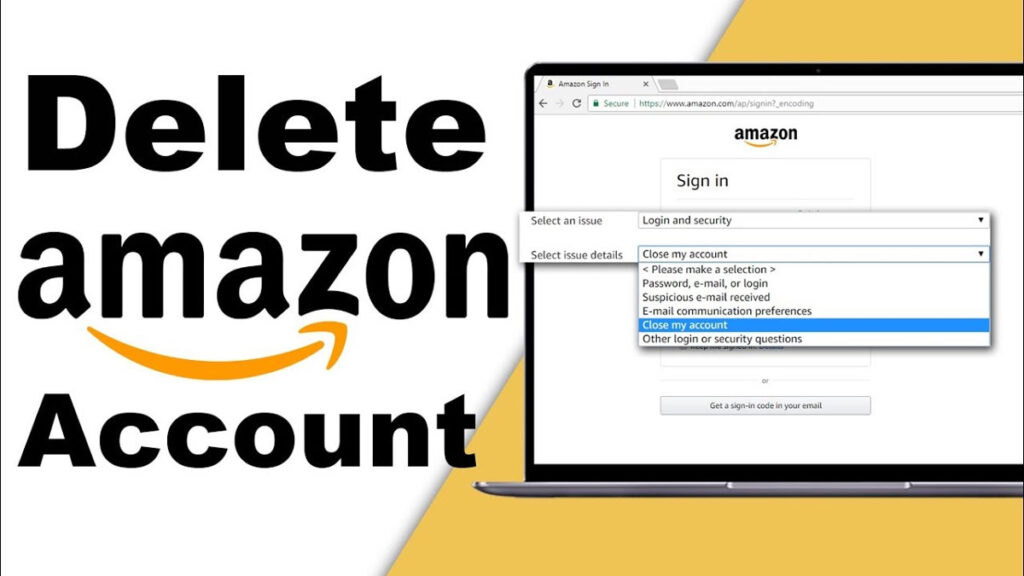 Things to Consider Before Deleting an Amazon AccountBefore closing ...
... an Amazon account, you must know that it is not only the online shopping ability via Amazon that you will lose. Based on how much users utilize the services and products of Amazon, they will lose access to all services associated with that email address or account. This includes the Amazon gift card balance, Prime Video subscription, and music, podcast, video, and e-book purchases. AdvertisementYou will lose the order history forever or will not be able to see your posts and reviews. Amazon devices like Fire TV products, Echo, e-readers, and tablets may need a different account. Also, remember that if you utilize this login information on any other regional Amazon website (for example, .ca, .com, .co.uk, .fr, etc.), you will lose access to them. Following are some important things you must do before deleting your Amazon account:Utilize the Amazon gift card balance you may have available. You will lose the remaining amount forever if you close your account.Remember to download and back up everything you have kept on your Amazon Photos. You will lose your files after shutting down your account.Cancel the Prime membership. Move to the Amazon website and hit the Account & Lists tab under your initials. Move to the Memberships & Subscriptions tab and choose the Prime membership settings option. Then, hit the Manage Membership tab and choose End Membership.Cancel the open orders if you can.Gather details about your Amazon account before deleting it, like the subscription information, the order history, etc. Move to Account & Lists and move to the Data & Privacy section and hit the Request the Information tab.Users who utilize Amazon for business will lose access to their Amazon Affiliate account and Selling Partner. Steps to Delete an Amazon AccountTo delete an Amazon account permanently, you can follow these instructions.Move to the official Amazon website and navigate to the Accounts and List tab.Then, go to the Data and Privacy section, and tap the Close My Account tab. There you will see a long warning, but you can look to confirm that you remember to back up the information or cancel the services or plans first.After this, choose the reason for cancellation, tick the “Yes, I wish to permanently close the account and delete my data” box, and hit the Confirm button. On the Amazon mobile app, move to the Account tab. The process is the same. Tap the Close My Account tab and confirm the selection. Once Amazon accepts the account cancellation request (it can take a few days), you will obtain an email from Amazon for final confirmation. Amazon will only delete the account once the user confirms the account deletion via email.Also Read: How to Close and Permanently Delete PayPal AccountFrequently Asked QuestionsQues: How long does Amazon take to delete my account?And: You will obtain an email requesting the final confirmation in 1 to 24 hours after requesting an account closure. Then you will get five days to reply to the email from Amazon. If you do not confirm, the company won’t delete the account.Ques: How can I permanently delete an Amazon account?Ans: To permanently delete an account, move to the official Amazon website and go to your account page. Then, specify the password and hit the Sign-in tab. Tick the “Yes, I want to permanently close my Amazon account and delete the data” box. After this, tap the Close My Account tab.Ques: Does deleting my Amazon account cancel Prime?Ans: Closing an Amazon account permanently means losing access to Amazon’s services and products. This includes Amazon Pay, Amazon Prime, Amazon photos, gift cards, Kindle content, and others.Ques: Can I retrieve my Amazon account after closing it?Ans: No! After deleting your account, you cannot recover it, so confirm before deleting it. You can open a new Amazon account to access the services and products of the company again.Ques: What should I do to remove my email from Amazon?Ans: If you wish to remove your email account from an Amazon account, you can replace the email address with another one. Sign in to your account and hit the Accounts and List tab. Then, tap the Your Account tab and choose the Login & Security option. Lastly, hit the Edit tab next to your email address.Source:https://hariguide.com/how-to-delete-your-amazon-account/
Add Comment
Automobiles Articles
1. Real-world Driving Guide: Managing Ev Range In Salem TrafficAuthor: Suryabalavinfast
2. Get To Know The Fuel System Of Automobiles
Author: Gary Martin
3. Vinfast Showroom Locations And Test Drive Experience In Salem & Erode
Author: Suryabalavinfast
4. Car Inspection And Custom Off-road Builds In Dubai, Uae
Author: CarspaceUAE
5. Holden Colorado Exhaust System: Performance And Reliable Exhaust Flow
Author: SanjuSeo
6. Micro Channel Heat Exchangers: A Compact Solution For High-performance Cooling
Author: Nbrcoolingsystem
7. Agricultural Starters: Reliable Tractor & Farm Equipment Starting Power
Author: Amelia
8. Why Should You Buy A New Harley-davidson For Yourself?
Author: Levi Fysh
9. Common Issues With A Volkswagen That Need Immediate Attention
Author: Oliver Mertin
10. Quick And Reliable Emergency Tyre Fitting Explained
Author: Tyre Expert Ltd
11. Vinfast Vf6 Features And Local Drive Experience In Salem & Erode
Author: Suryabalavinfast
12. Key Advantages Of Emergency Tyre Fitting
Author: Tyre Expert Ltd
13. Unlocking The Benefits Of Choosing The Best Driving School
Author: Eleanor Thompson
14. 200 Series Exhaust System: Improving Performance, Sound And Efficiency
Author: SanjuSeo
15. Vinfast Evs In Salem & Erode: Models, On-road Price & Buyer Guide
Author: Suryabalavinfast