


ALL >> Computers >> View Article
Forensic Guide To Whatsapp Data Acquisition



Instant messaging apps have become the de-facto standard of real-time, text-based communications. The acquisition of instant messaging chats and communication histories can be extremely important for an investigation. In this article, we compare the five top instant messaging apps for iOS in the context of their forensic analysis.
Acquisition and Extraction
Speaking of iOS, there are several methods to acquiring communications going through an instant messaging app. The MITM (man-in-the-middle) attack is practically out of the question for most modern instant messaging apps; if there are exceptions, we aren't aware of those. Even on Android devices, a MITM attack would require installing a third-party SSL certificate, and even that may not work for some instant messengers.
The ability to obtain communication histories from the vendor is a great tool in the hands of the law enforcement. The policies of different vendors vary greatly from near-instant full disclosure to flat non-disclosure with stops in between.
Cloud extraction may be possible from several sources, which include iCloud synchronized ...
... data (including end-to-end encrypted data), iCloud backups and stand-alone backups in iCloud Drive. It's up to the vendor to decide where and how to store the data; more on that later.
Finally, the data can be extracted from the iPhone device itself. For some messaging apps, logical extraction via iTunes-style backups is enough, while some other messengers don't store anything in local backups. Imaging the file system (and, in some cases, decrypting the keychain) is always enough to gain full access to conversation histories.
Let us see the extraction options available for thetop instant messaging app, WhatsApp.
Today, WhatsApp is one of the most popular (if not the most popular) instant messaging tools worldwide. While WhatsApp communication is based on the Signal protocol employing end-to-end encryption, that fact alone does not make WhatsApp any more secure than other messaging apps as WhatsApp keeps a backup of its conversation histories, making them easily accessible with several acquisition techniques.
Legal requests: WhatsApp does not store conversation histories on its servers. As a result, only pending (undelivered) messages can be obtained with a legal request.
Vendor cloud: Facebook does not keep WhatsApp conversations on its servers, and cloud acquisition is not generally possible with one exception. Undelivered (pending) messages are still stored on the server, and can be downloaded with forensic software by authenticating as a new WhatsApp client.
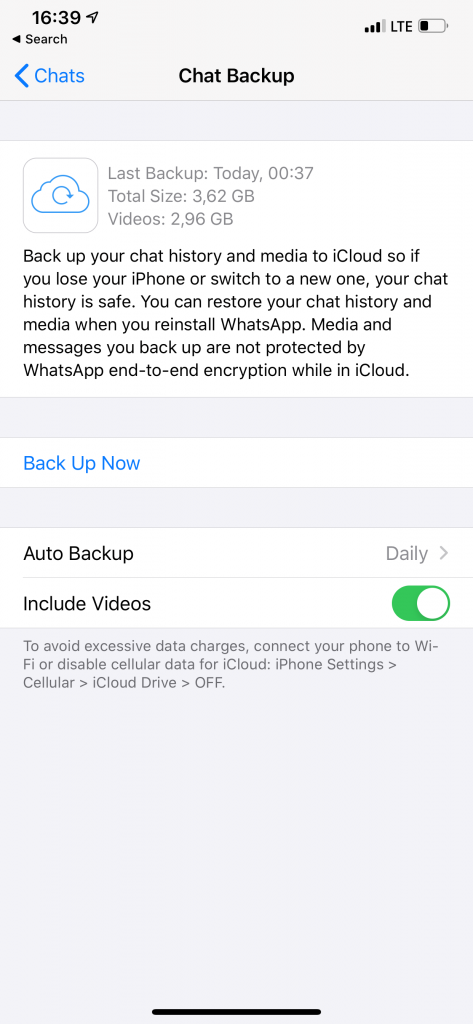
Local backups: More often than not, WhatsApp communication histories show up in both local and cloud iOS backups (there are exceptions).
iCloud backups: Same as above. More often than not, WhatsApp conversation histories can be extracted from iCloud backups.
iCloud Drive: WhatsApp has an option to save stand-alone, proprietary backups in iCloud Drive. While these backups can be easily downloaded, they are protected with end-to-end encryption. As a result, one must authenticate as a WhatsApp client in order to decrypt the backup (e.g. using Elcomsoft Explorer for WhatsApp). This requires access to the user's registered WhatsApp number.
File system: WhatsApp does not feature any additional protection to the working database. Once a file system image is captured from the iPhone, extracting and analyzing WhatsApp conversations is straightforward.
WhatsApp Verdict
The acquisition of the user's WhatsApp communications is easier than average. WhatsApp conversations can be extracted from nearly every available source including local and cloud backups.
Tools required: Elcomsoft iOS Forensic Toolkit and Elcomsoft Phone Viewer; or Elcomsoft Explorer for WhatsApp.
Elcomsoft Explorer for WhatsApp is a tool to download, decrypt and display WhatsApp communication histories. It automatically acquires WhatsApp databases from one or multiple sources, processes information and displays contacts, messages, call history and pictures sent and received. The built-in viewer offers convenient searching and filtering, and allows viewing multiple WhatsApp databases extracted from various sources. Visit Elcomsoft Explorer for WhatsApp official web page to find more information and try it for free.
Add Comment
Computers Articles
1. Managed Soc Services For It CompaniesAuthor: Devendra singh
2. Ai Data Protection Compliance: Best Practices For Secure Business Operations
Author: Devendra singh
3. Privileged Access Management (pam): Strengthening Enterprise Security And Access Control
Author: Umangp
4. Qlikview Tutorial For Data Analytics: Create Interactive Dashboards And Reports
Author: Tech Point
5. Enterprise Email Security: Strengthening Protection Against Evolving Email Threats
Author: Umangp
6. Access Management Market Trends: Future Growth And Emerging Technologies
Author: Umangp
7. Mobile App Scraping
Author: MObile app scraping
8. Master Data Management Solutions: Driving Data Quality Through Ai And Cloud
Author: Umangp
9. Digital Marketing Analytics Platforms: Key Trends, Benefits, And Future Market Outlook
Author: Umangp
10. Ai Governance Market: Trends Driving Responsible Ai Adoption
Author: Umangp
11. Spark Matrix™: Access Management
Author: Umangp
12. The Future Of Digital Content In India: Why Photo Sharing And Cloud Storage Are Converging
Author: vijaylaxmi soni
13. Looking For German Industrial Chemicals Suppliers? Choose The Right Partner With Roteschemie
Author: Roteschemie
14. Ai Augmented Software Development: Ai-driven Coding, Automated Testing, Risk Prediction, Team Collaboration, Productivity, And Market Outlook
Author: Umangp
15. Kiosk Systems In Hyderabad For Modern Businesses
Author: pbs